
AI can speed up lesson design—until it quietly takes the steering wheel. The risk isn’t “using AI.” The risk is letting a tool decide your learning goal, your standards, your inclusivity choices, and your assessment evidence.
A safer approach is simple: use prompts that produce options, keep you in control, and avoid common classroom pitfalls (invented facts, inappropriate level, hidden bias, or accidental data sharing).
Below is a practical, teacher-ready template you can reuse in 3 minutes to draft lesson ideas, activities, checks for understanding, differentiation, and rubrics—without losing your professional judgement.
What “safe prompting” means in lesson design
A safe prompt does three things:
-
It protects students (no personal data, age-appropriate, equity-aware).
-
It protects learning (goal-aligned, evidence-based, not “pretty but shallow”).
-
It protects your time (clear format, limited scope, classroom constraints).
Think of AI as your assistant, not your planner-in-chief.
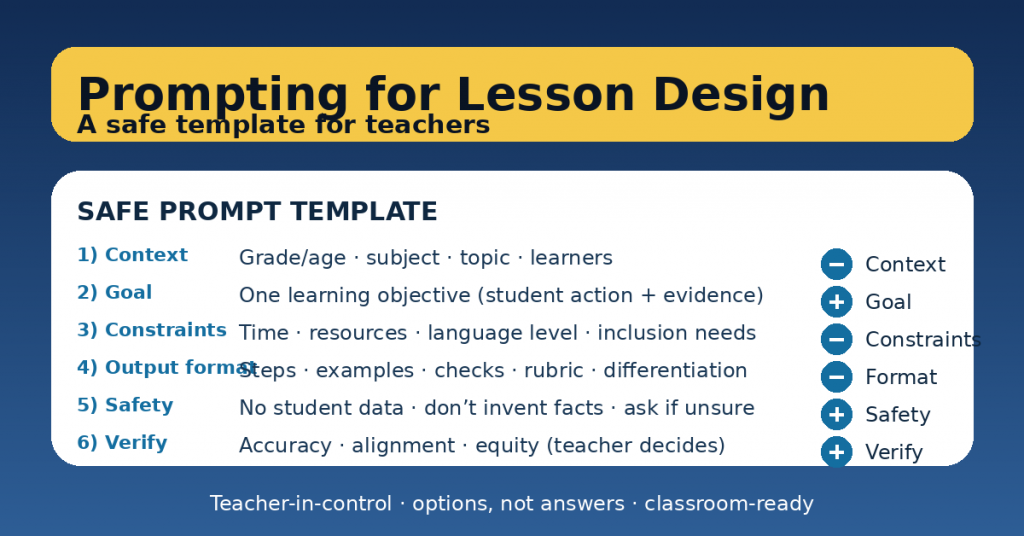
The SAFE Prompt Template (copy/paste)
Use this template as your default. Replace the brackets.
You are helping me as a teacher. Provide options, not final answers.
If information is missing, ask clarifying questions instead of inventing.
CONTEXT
– Grade/age: [ ]
– Subject: [ ]
– Topic/unit: [ ]
– Learner profile: [mix of levels, EAL, SEN supports, etc. without personal data]
GOAL (one sentence)
– Students will [do what] to demonstrate [evidence of learning].
CONSTRAINTS
– Time: [minutes]
– Resources: [paper / devices / lab / none]
– Grouping: [solo / pairs / groups]
– Language level: [ ]
– Inclusion needs: [UDL supports, scaffolds, alternatives]
OUTPUT FORMAT (be strict)
– Give me: [a lesson outline / 3 activities / exit ticket / rubric / etc.]
– Structure: [bullets, steps, timings, teacher script, student instructions]
– Include: [misconceptions, checks for understanding, differentiation]
– Avoid: [long lectures, busywork, stereotypes, sensitive content]
SAFETY & QUALITY
– Do not use student personal data.
– Do not invent facts, sources, or quotes.
– Flag anything that requires verification.
– Add a quick equity/accessibility check.
Now produce: [your specific request].
How to use it (in 5 practical moves)
1) Start with evidence, not activities
Before prompting, decide your evidence of learning:
-
an exit ticket,
-
a short written explanation,
-
a worked example with reasoning,
-
an oral justification,
-
a product + reflection.
Then your prompt becomes sharper and safer.
2) Make the goal “student action + evidence”
Instead of: “Teach persuasive writing”
Use: “Students will write a paragraph with claim + evidence + reasoning, assessed with a 4-criteria checklist.”
AI performs best when the target is observable.
3) Give constraints like a real teacher
Time, resources, grouping, and language level are what make a plan classroom-ready. Without them, you get generic advice.
4) Ask for 2–3 options (not one “perfect” plan)
Example request:
-
“Give me three activity options: low prep / collaborative / challenge.”
You keep autonomy and can choose what fits your class.
5) Always add a verification step
End every prompt with:
-
“List what I should verify (facts, appropriateness, bias, alignment).”
That’s the difference between “AI output” and professional lesson design.
Ready-to-use examples
Example A: 45-minute lesson outline (with checks + differentiation)
Now produce a 45-minute lesson outline with timings.
Include: a 2-minute retrieval starter, one mini-input (max 8 minutes), guided practice,
independent practice, and a 3-question exit ticket.
Add: 3 common misconceptions and how to address them.
Differentiation: one scaffold and one extension task.
Example B: Three exit tickets for the same objective
Now produce 3 exit tickets at different difficulty levels for the same learning goal.
Each should take 3–5 minutes and include a clear success criterion.
Example C: Rubric that isn’t bureaucratic
Now produce a rubric with 4 criteria and 4 levels.
Criteria must be observable evidence (not attitude).
Include one example of what a “strong” and “developing” response looks like (brief).
A quick “teacher-in-control” checklist
Before you use any AI-generated lesson material, ask:
-
Does it match my goal and my evidence?
-
Is the level appropriate for my learners?
-
Is it inclusive (language, access, assumptions)?
-
Are there facts or claims I must verify?
-
Does it keep student thinking central (not AI doing the work)?
