
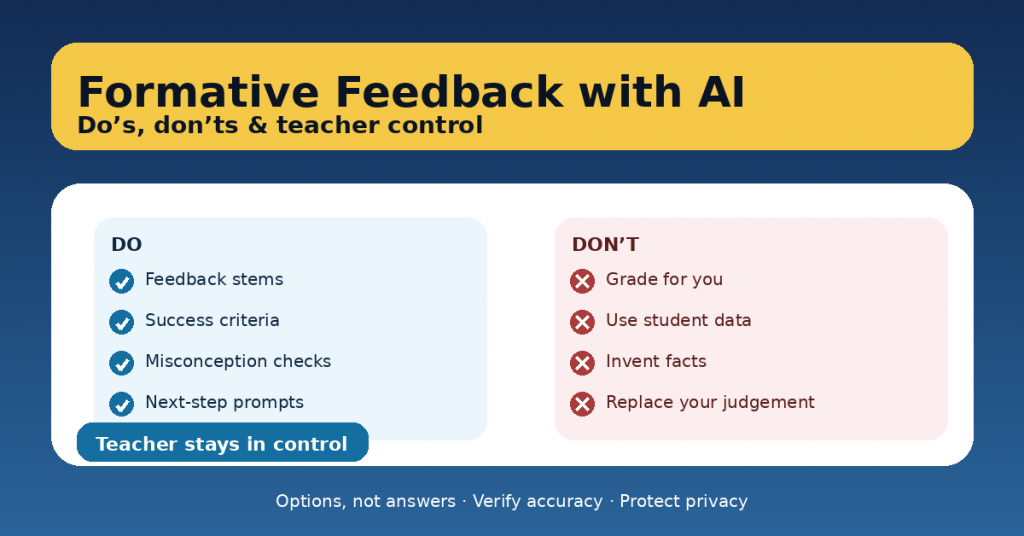
Formative feedback is one of the highest-impact teaching moves we have—yet it’s also one of the most time-consuming. AI can help, but only if it supports your judgement instead of replacing it. The goal is not “AI feedback.” The goal is better feedback systems: clearer success criteria, faster next steps, and more consistent guidance—while the teacher stays in control.
This article shows a practical way to use AI for formative feedback with do’s, don’ts, and teacher-controlled routines you can adopt immediately.
What AI should do in formative assessment
Used well, AI can:
-
generate feedback sentence stems aligned to your rubric,
-
suggest next-step prompts for improvement,
-
create common misconception checks,
-
help you draft self- and peer-assessment tools,
-
turn your criteria into student-friendly language.
AI should produce options, not final judgements.
The non-negotiables: teacher control
Before any AI-assisted feedback goes to students, you decide:
-
What quality looks like (success criteria / rubric)
-
What evidence matters (student work, process, reasoning)
-
What the next step is (a practice move, not “do better”)
-
What is safe and appropriate (privacy, tone, fairness)
A good rule: AI can help you write the feedback, but it can’t own the standard.
DO’s: high-value, low-risk ways to use AI
1) Do use AI to create feedback stems aligned to success criteria
Instead of writing 30 variations of the same message, ask AI to produce:
-
“Glow” stems (what works)
-
“Grow” stems (what to improve)
-
“Next-step” stems (what to do next)
Example use:
-
“Create 10 feedback stems for ‘claim-evidence-reasoning’ at three levels of quality.”
You’ll still choose which ones match the student work, but your writing time drops.
2) Do ask AI for misconception checks (so feedback targets thinking)
Often we comment on surface issues (format, spelling) when the real issue is conceptual.
Ask for:
-
likely misconceptions,
-
quick questions to detect them,
-
micro-explanations to address them.
This makes your feedback more instructional and less editorial.
3) Do turn rubrics into student-friendly checklists
Students improve faster when they can see the target.
Use AI to convert criteria like:
-
“Uses evidence appropriately and explains reasoning”
into: -
“I included at least two pieces of evidence.”
-
“I explained how my evidence supports my idea.”
Now feedback becomes: “Check item 2 and revise.”
4) Do design feedback routines that scale
AI helps most when it improves your system, not when it tries to judge every line.
Strong routines:
-
one class-wide “next step” after reviewing patterns,
-
small groups based on needs,
-
feedback rotation (teacher table + peer checklist),
-
quick re-submission cycles.
AI can generate the tools; you run the learning.
5) Do use AI to write prompts that require student ownership
If students use AI themselves, feedback should push ownership:
-
“Explain why you chose this evidence.”
-
“Show your steps.”
-
“Add a reflection: what changed after feedback?”
AI can help draft these prompts, but the task design keeps learning human.
DON’Ts: where AI creates risk
1) Don’t feed AI personal student data
Avoid names, identifying details, behavior histories, disability information, grades linked to identity, or any content that could identify a child. Use anonymized excerpts or teacher-created samples.
2) Don’t outsource grading decisions
AI can help you draft rubric language or suggest what to look for, but final evaluation must be yours to ensure fairness and accountability.
3) Don’t accept output without verification
AI can sound confident and be wrong. For feedback, that can harm learning and trust. Always check:
-
accuracy,
-
alignment with your criteria,
-
tone and appropriateness.
4) Don’t let AI “do the learning”
If AI rewrites student work or produces the final solution, feedback becomes meaningless. Keep AI in the role of:
-
coaching,
-
prompting,
-
clarifying,
not producing final answers.
The Teacher-Controlled Feedback Workflow (10 minutes)
Here’s a repeatable routine that keeps you in charge:
Step 1: Define the success criteria (2 minutes)
Write 3–5 bullet points:
-
“Clear claim”
-
“Relevant evidence”
-
“Reasoning explains the link”
-
“Organized paragraph”
-
“Accurate vocabulary”
Step 2: Identify patterns (3 minutes)
Scan 8–10 pieces quickly and note:
-
common strengths,
-
common gaps.
Step 3: Use AI for feedback stems (3 minutes)
Prompt AI to generate:
-
6 glow stems,
-
6 grow stems,
-
6 next-step prompts,
all tied to your criteria.
Step 4: Deliver feedback as next steps (2 minutes)
Give:
-
one strength,
-
one improvement focus,
-
one next action (specific practice move).
This is faster and more effective than writing paragraphs.
A safe prompt you can copy/paste
Use this to keep AI supportive and controlled:
The bottom line
AI can make formative feedback lighter and more consistent—if it strengthens teacher judgement instead of replacing it. The safest, most effective use is when AI helps you generate tools and language, while you control criteria, evidence, and decisions.
