
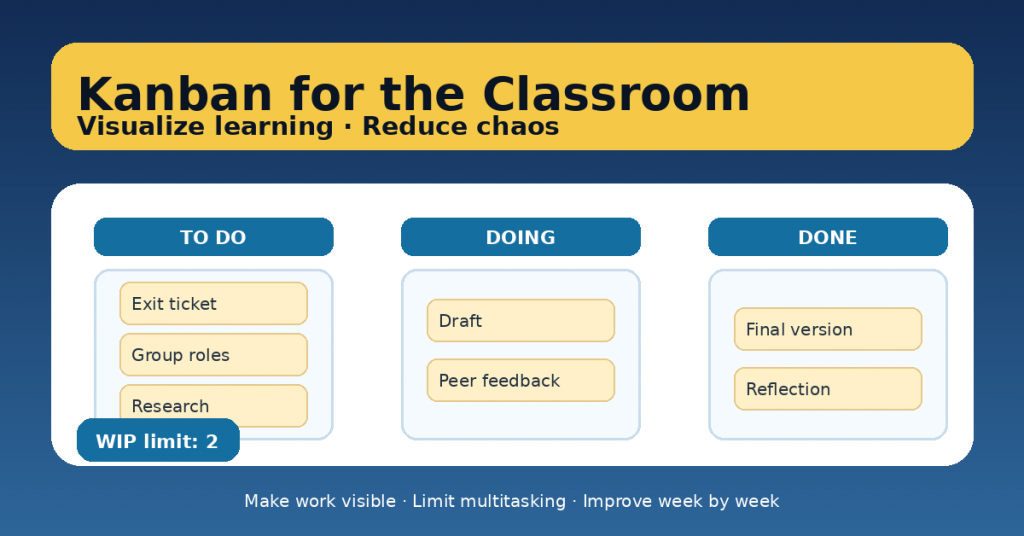
Classrooms get chaotic for predictable reasons: too many tasks at once, unclear expectations, invisible progress, and group work that turns into “someone did everything” (or no one did). Kanban is a simple visual system that helps both teachers and students see the work, manage attention, and finish what matters.
You don’t need a fancy tool. A whiteboard, a wall poster, or a shared digital board is enough. The point is not to be “perfectly Agile.” The point is to make learning visible, manageable, and improvable.
What Kanban is (in plain teacher language)
Kanban is a way to organize work using:
-
a board (columns that show the flow of work),
-
tasks (small, clear units of learning work),
-
a WIP limit (Work In Progress: how many tasks can be “in progress” at the same time),
-
regular check-ins (short moments to update and improve).
The magic is the WIP limit: it reduces multitasking, which reduces chaos.
The simplest Kanban board you can run tomorrow
Start with three columns:
TO DO → DOING → DONE
Optional 4th column:
-
BLOCKED (waiting for something: teacher feedback, materials, group decision, etc.)
That’s it. Don’t over-design.
6 practical steps to set it up (and actually keep it working)
1) Define the learning evidence first
Before listing tasks, decide: what evidence proves learning?
-
an exit ticket,
-
a solved problem set with reasoning,
-
a paragraph or explanation,
-
a product + reflection,
-
a short oral check.
When evidence is clear, tasks become meaningful (not busywork).
2) Break work into “real tasks,” not categories
Bad task: “Project” or “Study”
Good task: “Write 3 key claims + evidence,” “Create glossary of 10 terms,” “Draft slide 1–3,” “Peer feedback using checklist.”
Rule: if a student can’t start it in 5 minutes, it’s still too big.
3) Add a WIP limit (the chaos reducer)
WIP = maximum number of tasks allowed in DOING.
Suggestions:
-
Individual work: WIP 1–2
-
Group work: WIP 2–3 per group
-
Whole class board: WIP 6–10 total, depending on class size
When DOING is “full,” students must finish or unblock before starting new tasks.
4) Make roles visible in group work
Kanban doesn’t fix group dynamics by itself. Add clarity:
-
every task card includes owner(s) (name/initials),
-
larger tasks require two owners (shared accountability),
-
one student is board keeper (updates status during check-ins).
This reduces “passenger mode.”
5) Run a 5-minute Kanban check-in (twice a week)
Use a short routine:
-
What moved to DONE?
-
What is BLOCKED (and what’s the next action)?
-
What is the next task to pull into DOING?
Teacher move: don’t “push” tasks onto students. Students pull the next task when capacity is available.
6) End the week with a 10-minute mini-retrospective
Ask:
-
What helped us finish work this week?
-
What created delays or confusion?
-
What one change will we try next week?
Only one change. Small improvements beat big reforms.
How to use Kanban for learning (not just for tasks)
Kanban is strongest when the board reflects learning, not just “stuff to do.”
Try adding labels like:
-
Understand (read, watch, discuss)
-
Practice (guided + independent)
-
Prove (quiz, exit ticket, product)
-
Reflect (self-check, revision, next steps)
This helps students see learning as a process, not a pile of assignments.
Common pitfalls (and quick fixes)
-
The board becomes decoration
Fix: check-in twice a week + board updates count as process evidence. -
Too many tasks in DOING
Fix: lower WIP; finishing is a skill. -
Tasks are too big
Fix: split until each card fits 15–30 minutes. -
Group work feels unfair
Fix: owners on each card + individual reflection or checkpoint.
A ready-to-copy classroom setup (example)
Project: create a short podcast episode on a historical event.
TO DO
-
Pick event + angle
-
Find 2 reliable sources
-
Write outline (intro, 3 points, conclusion)
-
Draft script
-
Record test audio
-
Peer feedback (checklist)
-
Final record + edit
-
Reflection: “What I learned / what I’d improve”
WIP limit: 2 tasks in DOING per group.
You’ll be surprised how much smoother the work becomes.
