
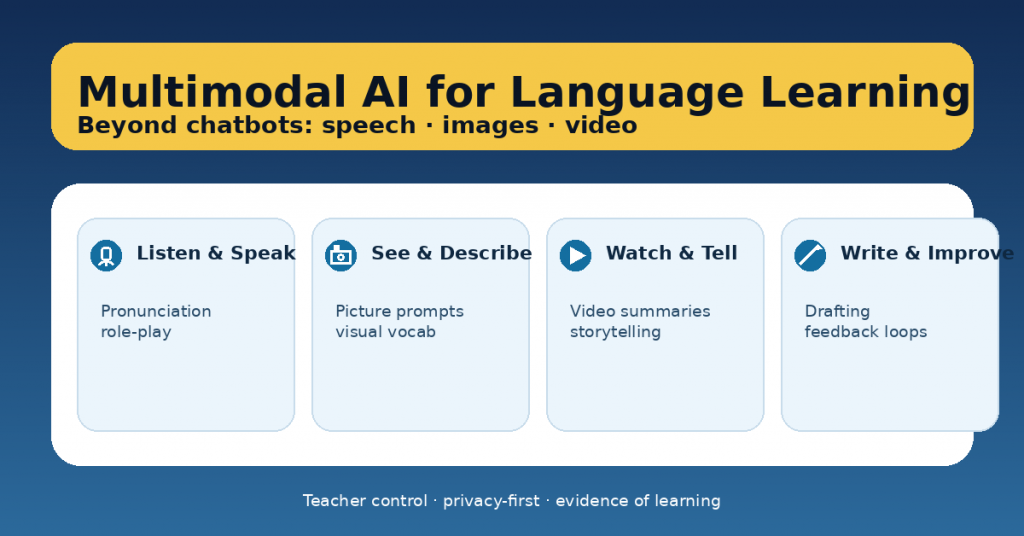
When teachers hear “AI for language learning,” the first image is usually a chatbot. Chatbots can help—but they’re just one slice of what’s possible. The real shift is multimodal AI: tools that can work with speech, images, video, and text together.
That matters because language learning is multimodal by nature. Students don’t just “chat.” They listen, speak, interpret visuals, negotiate meaning, and revise writing. Multimodal AI can support those skills—if we design tasks that keep students thinking and keep teachers in control.
This article shows practical ways to use multimodal AI beyond chatbots, with classroom-ready routines and guardrails.
What “multimodal AI” means in teacher terms
Multimodal AI tools can:
-
listen to student speech and respond,
-
work with audio (pronunciation, fluency practice),
-
interpret images (picture prompts, visual vocabulary, describing scenes),
-
support video-based tasks (summaries, retelling, scripted speaking),
-
improve writing through structured feedback (not just rewriting).
The best use is not “AI as answer machine,” but AI as practice partner + feedback amplifier.
6 high-impact multimodal use cases (with fast classroom setups)
1) Speaking rehearsal with role-play (audio)
Goal: fluency + pragmatic language (polite requests, disagreement, negotiation).
How: students rehearse a role-play (ordering food, parent-teacher meeting, debating a topic).
AI’s job: stay in character, ask follow-up questions, increase difficulty gradually.
Teacher control: you provide the scenario, target phrases, and the success criteria.
Evidence of learning: a 30–60 second recording + self-reflection (“2 things I improved / 1 next goal”).
2) Pronunciation and clarity drills (audio + teacher criteria)
Goal: intelligibility (not “perfect accent”).
How: students read a short text, then re-record after targeted feedback.
AI’s job: highlight one pronunciation focus (stress, /θ/ vs /t/, linking, vowel length).
Teacher control: define what “clear enough” means for your level.
Evidence of learning: before/after clip + one sentence explaining the change.
3) Picture prompts for descriptive language (image + speech/text)
Goal: vocabulary, prepositions, narrative detail, inference.
How: students describe a picture, then extend it (what happened before/after).
AI’s job: ask “show me, don’t tell me” questions (“What makes you think that?”).
Teacher control: require target structures (e.g., past continuous, comparatives).
Evidence of learning: a short description + 3 highlighted target structures.
4) Video-to-speaking: summarise, retell, transform (video + speech)
Goal: listening comprehension + speaking structure.
How: students watch a short clip, then:
-
summarise in 3 sentences,
-
retell from another perspective,
-
give a 30-second opinion with one reason + example.
AI’s job: prompt structure (“Start with… then… finally…”) and ask comprehension checks.
Teacher control: choose the clip and the speaking frame.
Evidence of learning: transcript notes + oral recording.
5) Writing improvement loops (text + rubric)
Goal: stronger writing through revision, not AI “polish.”
How: students draft → get feedback → revise → reflect.
AI’s job: give rubric-aligned feedback as next steps, not rewriting.
Teacher control: you supply the rubric and require students to explain revisions.
Evidence of learning: draft 1 + draft 2 + a short “what I changed and why.”
6) Multimodal projects (image/video + script + performance)
Goal: integrated skills + authentic communication.
Examples:
-
a mini documentary (video + narration),
-
a museum audio guide (images + spoken script),
-
a “how-to” tutorial (visual steps + instructions).
AI’s job: help students plan, rehearse, and check clarity against criteria.
Teacher control: define the product, audience, and DoD (Definition of Done).
Evidence of learning: storyboard + script + final performance + reflection.
The teacher control framework (so AI doesn’t take over)
Before students use AI, lock in these three controls:
1) Success criteria (what quality looks like)
-
Fluency target (time + pauses)
-
Required structures (3 connectors, 2 past tense verbs, etc.)
-
Audience clarity (can a peer understand without help?)
2) A “no-AI core”
What must be human:
-
final oral performance,
-
reasoning and choices,
-
reflection,
-
in-class checkpoint.
3) Evidence requirements
AI use is allowed only if students submit:
-
a draft/recording,
-
the feedback received (summarised),
-
what they changed,
-
what they’ll try next time.
This turns AI into practice, not substitution.
Common pitfalls (and how to avoid them)
Pitfall: AI rewrites student writing.
Fix: require “feedback only” prompts + track changes + a revision explanation.
Pitfall: students copy fluent output they don’t understand.
Fix: require oral defense (“Explain your word choices / meaning”) or a short comprehension check.
Pitfall: privacy risks.
Fix: no names, no personal data, anonymise samples, follow school policy.
Pitfall: too many tools.
Fix: choose one modality per unit (audio OR image OR video), then build a routine around it.
A simple “multimodal week” plan (repeatable)
-
Day 1: input + model (teacher provides structure)
-
Day 2: practice with AI (speaking/writing rehearsal)
-
Day 3: peer feedback + revision
-
Day 4: performance / submission
-
Day 5: mini-retro (“What improved? What’s the next goal?”)
Keep it small. Consistency beats novelty.
